Browser
Checking...
This is the browser currently open on this page.





Hours: Mon-Fri 9:00 AM-6:00 PM | Sat-Sun by Appointment Only
Enter the support password to continue to the RustDesk download and remote-help instructions.
This page is for remote support sessions with AZ Tech Ninja. Download the RustDesk installer on your Windows computer, open it, and we can walk you through the connection for troubleshooting, cleanup, software help, or guided fixes.
This can help confirm what browser and Windows machine you are using before the remote session starts.
These steps are written for people who do not do this often. If you are unsure at any point, stay on the phone with AZ Tech Ninja and follow the next step exactly as written.
Click Download RustDesk on this page. Your browser should save RustDesk.msi to the computer.
If the file does not open by itself, go to your Downloads folder.

You can also click the browser’s download area if you still see the file there.
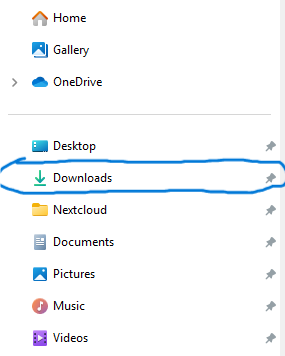
Once you find RustDesk.msi, double-click it to open it.
After the installer finishes, RustDesk should open on the screen.

Look for the large number in RustDesk labeled as your ID. That is the main piece of information to give AZ Tech Ninja.

After you share the RustDesk information, stay near the computer so you can approve prompts if needed.
If you are talking to AZ Tech Ninja by phone or text, this is the easiest wording:
Great when the issue can likely be handled without driving onsite.
Useful for app setup, settings fixes, account-related cleanup, and guided support.
Designed for customers who need help getting connected so support can begin quickly.
Phone: 602-753-8627
Email: support@aztechninja.com
If you are not sure whether this should be a remote job or an onsite job, call first and AZ Tech Ninja can point you to the right next step.
Call AZ Tech Ninja for help with computers, Wi-Fi, setup, repairs, and more.